
Tech support should know what they’ll find before they get to site: which rack, how big, what sits at which height, which switch port each camera or access point is on, and what is on the UPS. Strucit’s rack designer puts all of that in the plan, and in the report.
On the plan
- New tools in IT Infra: Rack (shortcut
r), UPS / No-break (shortcutu) and DVR / NVR. The old “Server rack” is now Server, a device you can mount like any other. - New rack: wall-mounted or floor-standing, from 3 to 44U in presets or any height from 1 to 52U, 19″ or 10″ mini rails, depth, front door and fan kit. The room is filled in from where the rack stands on the plan.
- Move into rack › in the menu of a switch, server, firewall, modem, UPS or recorder lists the plan’s racks with their free U. The device keeps its name, specs and cables; they now end at the rack, and moving the rack carries them. Unmount puts it back on the plan.
- A count badge on the rack icon says how many devices it houses, in the exports too.
Front view
Open rack shows the rack at scale, U numbers on both rails, U1 at the bottom. Click an item in the catalog to put it at the first free U, or drag it where you want it: a green ghost says “U10 · fits”, a red one names what it overlaps.
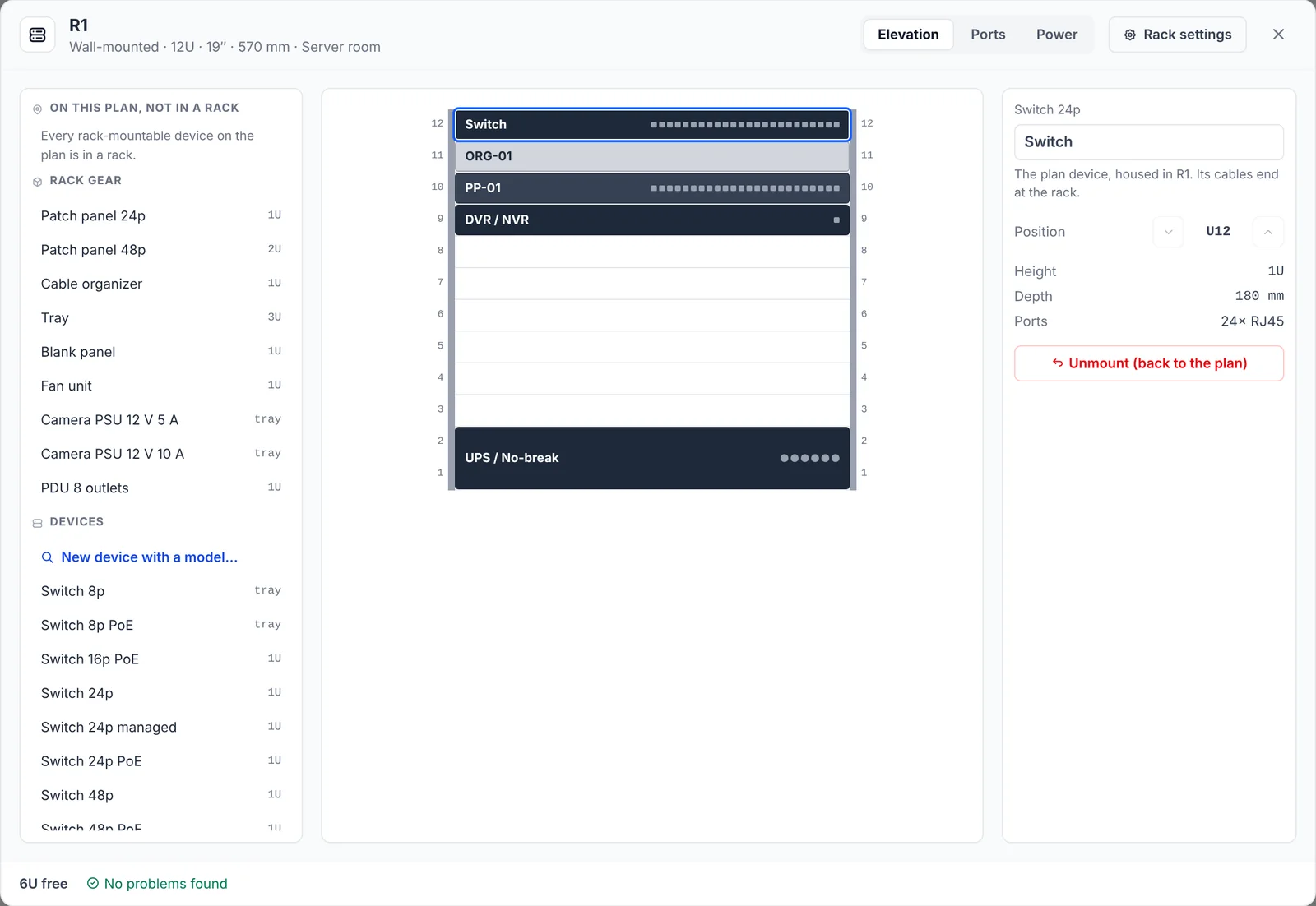
- Rack gear: patch panels (24 and 48 ports), cable organizers, trays for boxes without rack ears, PDUs, blank panels, fan units and a 12 V camera supply.
- Devices: the plan’s switches, servers, recorders and UPS not in a rack yet, each with Mount, or new ones that join the plan housed in the rack.
- Checks as you go: overlaps, items outside the rack, items deeper than the rack, a UPS above the bottom third, and a patch panel or switch with no organizer next to it.
Ports
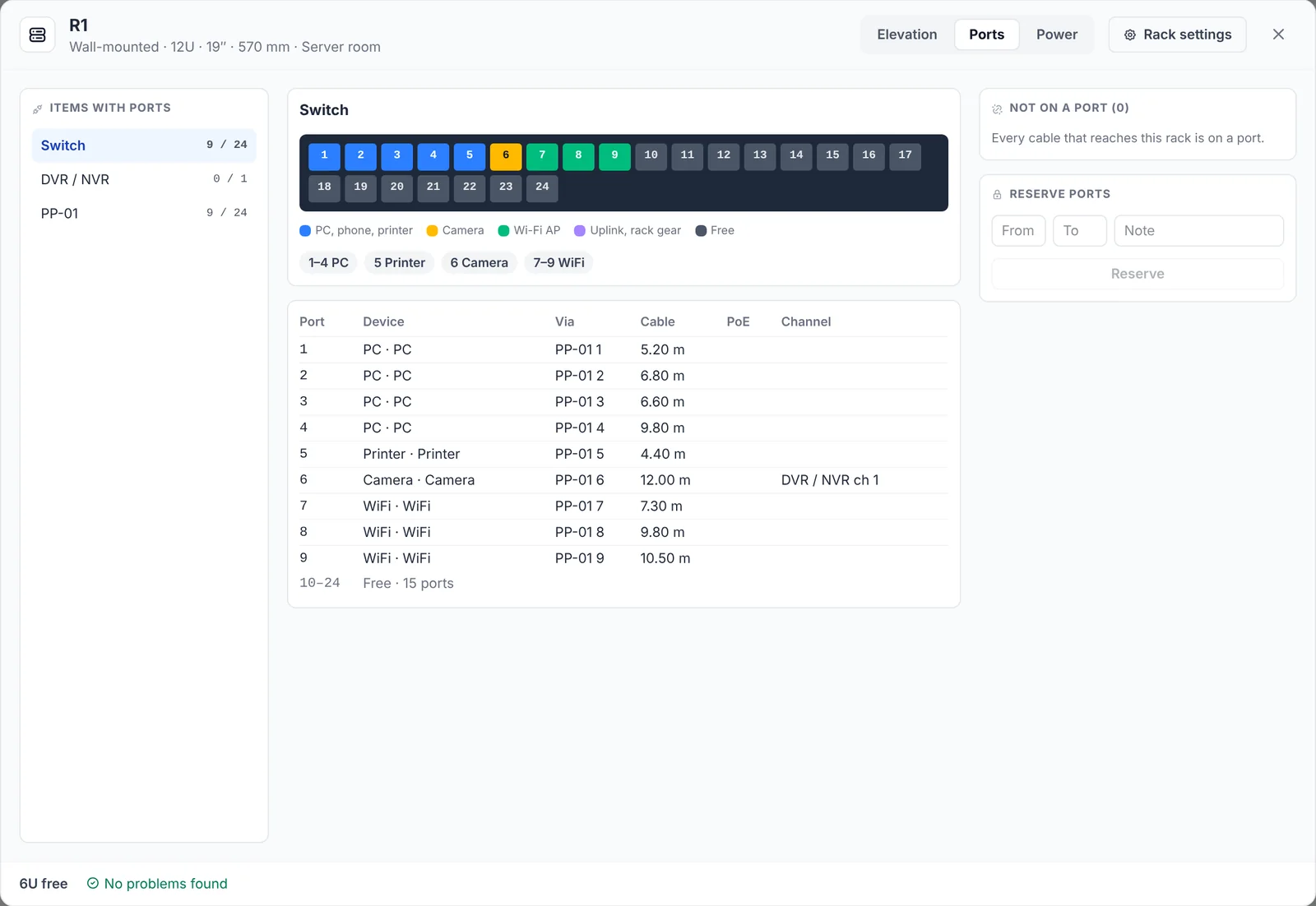
- A faceplate per item with every port coloured by what is on it: PCs, phones and printers, cameras, access points, uplinks, free. A port table lists each port’s device, the patch panel port it comes through, cable type and length, and PoE watts, with free runs collapsed.
- Not on a port lists the plan cables that end at the rack. Drag one onto a port, or Auto-assign them: each device type together, through the patch panel at the same port number. Reserve ports keeps a range free, with a note.
- PoE budget on each switch and PoE NVR: “PoE budget 49 of 384 W”. A patch panel port that PoE passes through says so, with its watts.
- Recorder channels: IP cameras get an NVR channel, from the PoE port they’re on or the next free one, and you can set it by hand; an NVR with more cameras than channels turns red. Analog cameras on coax land on a DVR’s BNC inputs, the BNC port being the channel.
Power
The Power tab draws the tree from the wall outlet through each UPS and PDU to what is plugged into it, each with its estimated draw. Per source: the load in watts against its rating, and outlets in use. Checks flag a source over its rating, a UPS over 80%, anything not plugged in, and a PoE switch or NVR that isn’t on a UPS, since the cameras and access points it feeds go down with it.
In the reports
- Text report: a RACKS section after SWITCH CONNECTIONS, with each rack’s specs, its contents U by U, a port map per item, the cameras with their port and channel, and the cables not on a port. A switch in a rack reads “(in R1, U14)”, and a rack counts as one power point.
- PDF, section 1.8 Racks: a spec table, a front view drawing, the contents, port maps and cameras with their channels, per rack. Leave it out with the Racks switch in the PDF settings.
On a phone, the rack opens as a full-screen sheet with the same tabs: the selected item docks at the bottom with large ▲/▼ buttons, and a long press drags it.
Free and Pro
The rack designer is free on every plan: racks, the front view, Ports, Power and the text report’s RACKS section. The 1.8 Racks section is part of the PDF export, which is Pro.
What it doesn’t do
- No rear view: the front view is a schematic for technicians, not a picture of the devices.
- Power and PoE figures are estimates, from each device model’s datasheet or from defaults based on common models. Check them against the datasheets before buying a UPS.
- No cable lengths inside the rack: patch cords are listed, not sized.
- No weight or load rating, no 0U vertical PDUs or side-mounted gear, and an item takes the full depth of its U.