
The World's Simplest
IT Infrastructure Planner
Stop using complex CAD software. Strucit is designed by IT people, for IT people. Draw rooms, drop servers, and map your network in seconds.
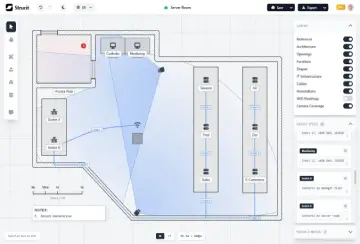
IT Infrastructure Planning Tools, Without the CAD
Designed specifically for IT people who need speed, precision, and easy-to-use documentation.
Floor Plans and Equipment Reports in Minutes
Sketch your room, drop your gear, and immediately export a visual plan complete with a report. Zero friction.
Built for IT, Not Architects
We stripped away the complex architectural stuff. You get everything you need, nothing you don't.
PNG, SVG and Client-Ready PDF Export
Download transparent PNGs for free. Pro adds scalable SVGs, editable project files, and polished PDF reports.
WiFi Heatmap and Camera Coverage Planning
PROPredict signal strength and camera blind spots before you install anything — the heatmap even accounts for concrete vs. glass walls.
Upgrade to Pro →Detect Walls from a Floor Plan or Sketch
PROUpload a floor plan and detect walls, doors, and windows automatically, right in your browser — no AI service, no round trip. Just 95% of a clean design in seconds.
Upgrade to Pro →Real-Time Collaboration and Share Links
PROCo-edit projects in real time, control who has access, or share a view-only link that requires no account.
Upgrade to Pro →Free vs Pro
Free and Pro Plans
Free plan draws your floor plan. Pro plan tells you what actually works in it.
Visual Floor Plan Editor
Draw rooms, drop racks, servers, APs, and cameras — right in your browser.
PNG Export & Text Report
Download your plan as an image plus an auto-generated equipment report.
Switch Connections Report
Auto-generated wiring map of every device plugged into each switch, plus one-click auto-wiring of selected devices to a target. Read more →
Instant Wall & Door Detection
Auto-detect walls, doors and windows from an uploaded plan or a phone photo of a hand sketch — entirely in your browser, no AI service. TP-Link Omada survey import included. Read more →
SVG Export & JSON Save/Restore
Export crisp vector graphics and save your project to reopen and edit later.
Client-Ready PDF
A polished A4 document — cover sheet, materials list, notes, floor plan, camera map and per-band WiFi coverage sheets. Read more →
Cloud Save & Folders
Keep projects backed up and reachable from any device. Organize cloud projects in nested folders. Read more →
Live Co-Editing
Work on one project together in real time — shared canvas, live cursors, shared undo/redo. Read more →
View-Only Share Links
Share your cloud project by email or as a public view-only link — no account needed to view. Read more →
Team & Organization Seats
An admin buys multiple seats and assigns Pro to each member — one plan for the whole team.
WiFi Heatmap
Predicted signal strength room-by-room, routed through doorways like real WiFi. Read more →
Automatic AP Placement
Pick a band and a coverage target and Strucit suggests the fewest access points that reach it, mounted on your walls — then places them on the plan in one undoable step. Read more →
Camera Coverage
Each camera's field of view, clipped by walls exactly like the real thing. Read more →
Cable Trays and Conduits
Conduits sized by the cables they carry, a tray where more than 17 pass, and every bracket, conduit body and clamp in the report. Read more →
Upgrade anytime — no long-term contract.
Upgrade to ProNew: Install & Go Mobile
Now installable and works great on your phone.
Strucit is a full PWA — install it on your computer or phone like a native app. And we rebuilt navigation from scratch for touch, so you can start a design or edit a project right from your phone.
Install as an App
Add Strucit to your home screen or desktop — installable PWA, no app store required.
Rebuilt for Touch
A brand-new mobile navigation lets you draw from scratch or edit existing projects comfortably on phones and tablets.
How to Plan an IT Infrastructure Layout
Get started for FREECreate your space
Draw a basic plan layout with magnetic elements, right in your browser.
Place your gear
Drop items in place with our easy-to-use library of racks, servers, cabling and more — then auto-wire a batch of devices to a switch in one click.
Specs and Notes
Document anything you need, add technical details to assets and easily share them with your team.
Download
Export the final design as an image, a client-ready PDF, or an auto-generated text report — ready for your documentation.
IT Infrastructure Planner FAQ
What is the best free IT infrastructure floor planner?
Is Strucit really free?
Do I need an account to use it?
Is my data secure?
Is this a CAD tool for architects and engineers?
Can I use this IT planner to document equipment quantities?
Can I use this to document server racks and cables?
Can I export my IT project plan?
Do I need to install anything to design my infrastructure?
Can I work on a plan with my team?
Ready to visualize your infrastructure?
Join network engineers, IT support and managers just like you who are using Strucit to design and document their IT infrastructure today.
Get Started for free