
Strucit’s devices start generic: a camera with a coverage preset, an access point at low, medium or high power. Pick the model you’re going to install and the plan works from its datasheet instead.
Pick a model
Select a device and open Model in its menu: search by brand or model, filter by brand, and each model shows its spec line, like Intelbras VIP 1230 B G4 · 2 MP · 82° · IR 30 m · PoE 4.8 W, with a link to its datasheet. Generic takes the model off again.
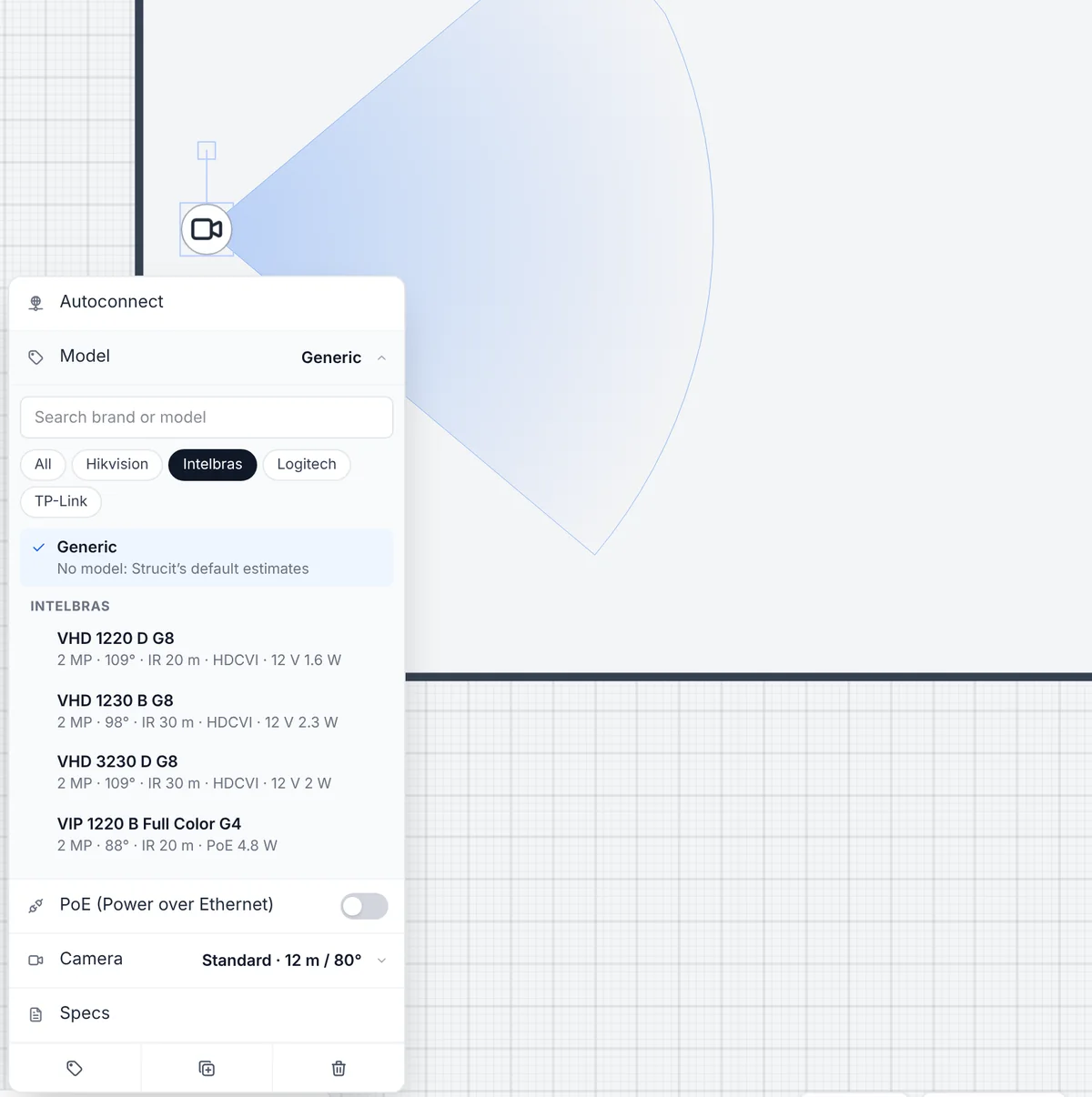
Placing several of the same? The Model chip in the placement toolbar of cameras, access points, DVR/NVR, switches, modems, firewalls and UPS places the next ones as that model, and the browser remembers the last pick for each type.
| Type | Brands |
|---|---|
| Cameras | Intelbras, Hikvision, TP-Link VIGI, Dahua, Logitech (meeting rooms) |
| Wi-Fi access points | Intelbras, Ubiquiti, TP-Link, Grandstream, MikroTik, Aruba Instant On |
| Switches | Intelbras, TP-Link, Huawei, MikroTik, Ubiquiti, D-Link, Grandstream, Aruba Instant On |
| Routers, gateways, ONTs | Intelbras, TP-Link, Ubiquiti, Grandstream, Huawei, MikroTik; Fortinet (firewall) |
| DVR / NVR | Intelbras, Hikvision, TP-Link VIGI, Dahua |
| UPS | SMS, Vertiv, Intelbras, APC, TS Shara |
The datasheet wins
A model’s figures replace Strucit’s defaults wherever the plan uses them:
- Specs: the model’s line goes at the top of the device’s specs, so the equipment list and every report name it. Your own notes stay below it.
- PoE: a PoE camera or access point is set to PoE, and its own draw counts in the rack’s PoE budget.
- Cameras: the field of view and the IR range set the cone, in place of the preset.
- Access points: the band and maximum EIRP feed the Wi-Fi heatmap. The power level is then read-only, and only the model’s bands are offered.
- In a rack: a switch, recorder or UPS mounted in the rack designer takes its height, ports, depth and draw from the model, and a UPS’s load is measured against its own rating.
Camera cones in DORI bands
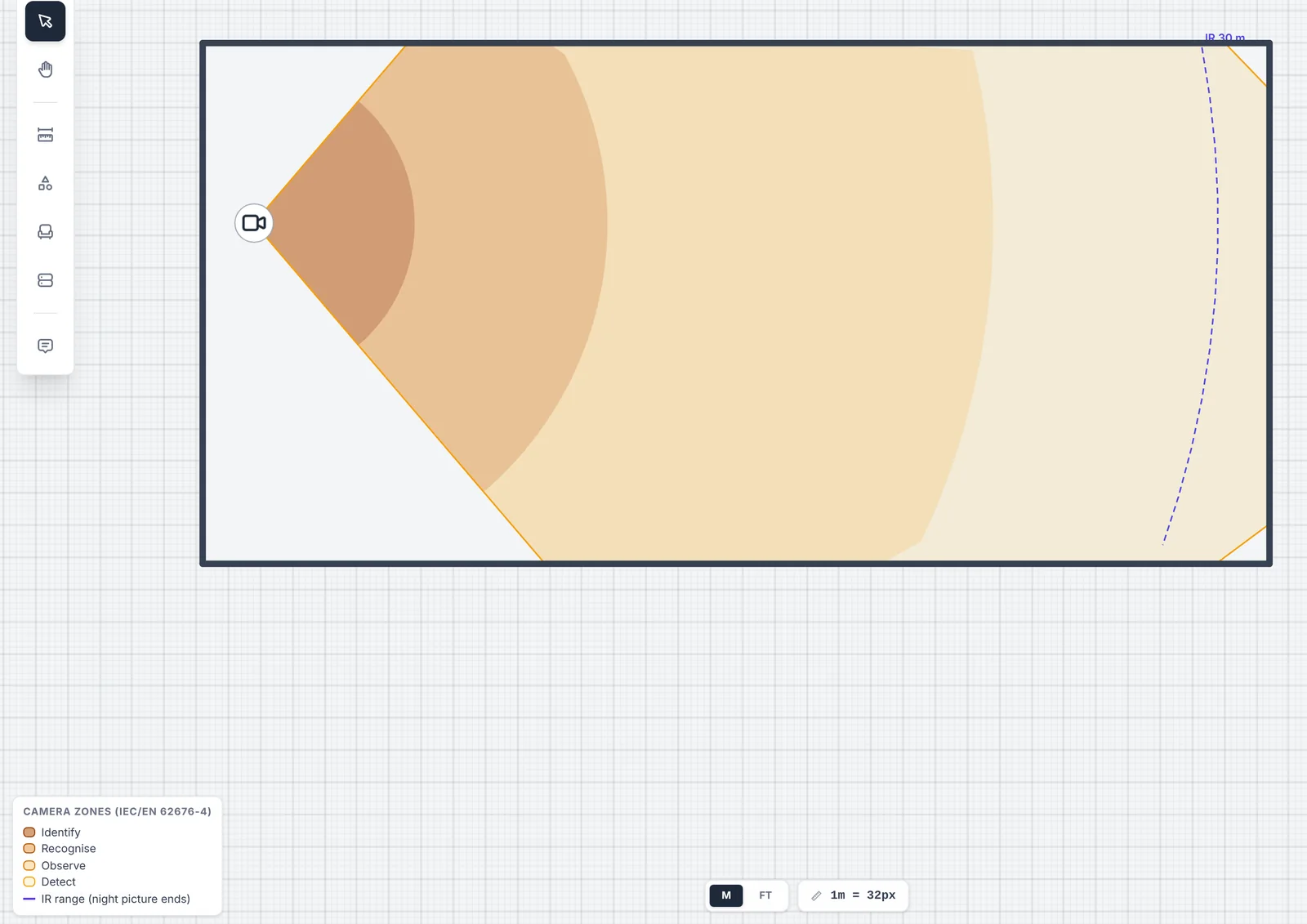
Where the datasheet gives DORI distances, the camera’s cone is split into the four bands of IEC/EN 62676-4, darker nearer the camera: Identify, Recognise, Observe and Detect. The IR range is a dashed arc across the cone, labelled “IR 30 m”, where the night picture ends. Walls still cut every band, and the canvas and the PDF camera map show the key.
The catalog also has analog cameras, Intelbras HDCVI and Hikvision Turbo HD, for coax runs to a DVR. Their spec line gives the 12 V draw, and they are never PoE. Whether a camera is analog follows the cable: a coax cable to it makes it analog.
A Device models section in every report
When a plan uses models, the text report and the PDF get a Device models section: a note that the figures come from each model’s datasheet and are modelled for planning, to be checked before buying or installing, then each model with its type, how many devices use it and a link to its datasheet. Estimated figures are flagged on their row.
Free and Pro
Picking models is free on every device, and so is the text report’s Device models section. Where the figures show up in a Pro feature, they follow it: the DORI bands are drawn by the camera coverage layer, the EIRP by the Wi-Fi heatmap, and the PDF has its own Device models section, all Pro.
What it doesn’t do
- The catalog is built in: no custom models and no organization catalog. Leave a device on Generic and type its specs by hand.
- Some figures are estimates: where a datasheet gives TX power rather than EIRP (Ubiquiti, Grandstream), the Wi-Fi power is TX power plus antenna gain, flagged in the report. A figure missing from the datasheet falls back to Strucit’s default.
- DORI bands only where the datasheet gives them. They are not worked out from resolution and lens, and Logitech’s meeting-room cameras have no IR or DORI.
- No prices or stock: the catalog is for planning, not a price list.