
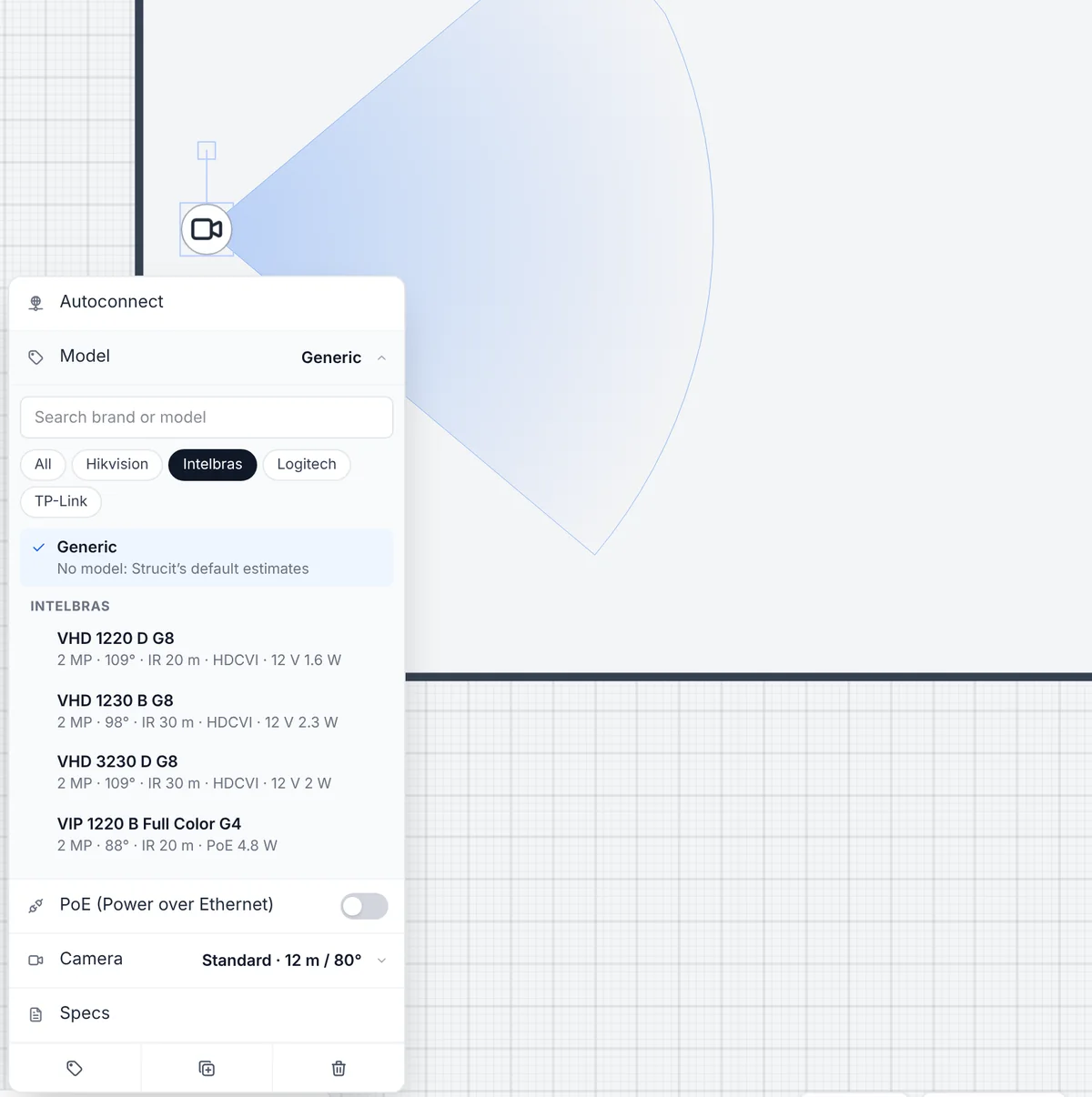
A generic camera with a “Standard” preset is fine for a first sketch. A quote is another matter: the client is buying a specific camera, with its own lens, IR range and PoE draw, plugged into a specific switch with its own PoE budget. If the plan works from round defaults, the coverage and the power figures you hand over are round defaults too.
Strucit’s device catalog closes that gap. Set a placed device to a real manufacturer model and the plan works from that model’s datasheet instead.
What’s in the catalog
More than 120 models, starting with the brands Brazilian integrators install every day:
- Cameras: Intelbras, Hikvision, TP-Link VIGI and Logitech meeting-room cameras, one entry per lens, including Intelbras HDCVI and Hikvision Turbo HD analog cameras for coax runs to a DVR.
- Wi-Fi access points: Intelbras, Ubiquiti, TP-Link and Grandstream.
- Switches: Intelbras, TP-Link, Huawei, MikroTik, Ubiquiti, D-Link and Grandstream.
- Routers, gateways and ONTs: Intelbras, TP-Link, Ubiquiti, Grandstream and Huawei, plus a Fortinet firewall.
- Recorders and UPS: Intelbras DVRs and NVRs; UPS from SMS, Vertiv, Intelbras, APC and TS Shara.
Pick a model
Select a device and open Model in its menu. Search by brand or model, filter by brand, and each model shows its spec line, like Intelbras VIP 1230 B G4 · 2 MP · 82° · IR 30 m · PoE 4.8 W, with a link to where its figures come from. Generic takes the model off again.
Placing ten of the same camera? The Model chip in the placement toolbar of cameras, access points, DVR/NVR, switches, modems, firewalls and UPS places the next ones as that model, and the browser remembers your last pick for each type.
What the datasheet changes
A model’s figures replace Strucit’s defaults wherever the plan uses them:
- Specs. The model’s line goes at the top of the device’s specs, so the equipment list and every report name it. Your own notes stay below it.
- PoE. A PoE camera or access point is set to PoE, and its own draw counts in the rack’s PoE budget.
- Cameras. The horizontal field of view and the IR range set the coverage cone, in place of the preset.
- Access points. The bands and the maximum EIRP feed the Wi-Fi heatmap. The power level becomes read-only, and only the model’s bands are offered.
- In a rack. A switch, recorder or UPS takes its height, ports, depth and draw from the model, and a UPS’s load is measured against its own rating.
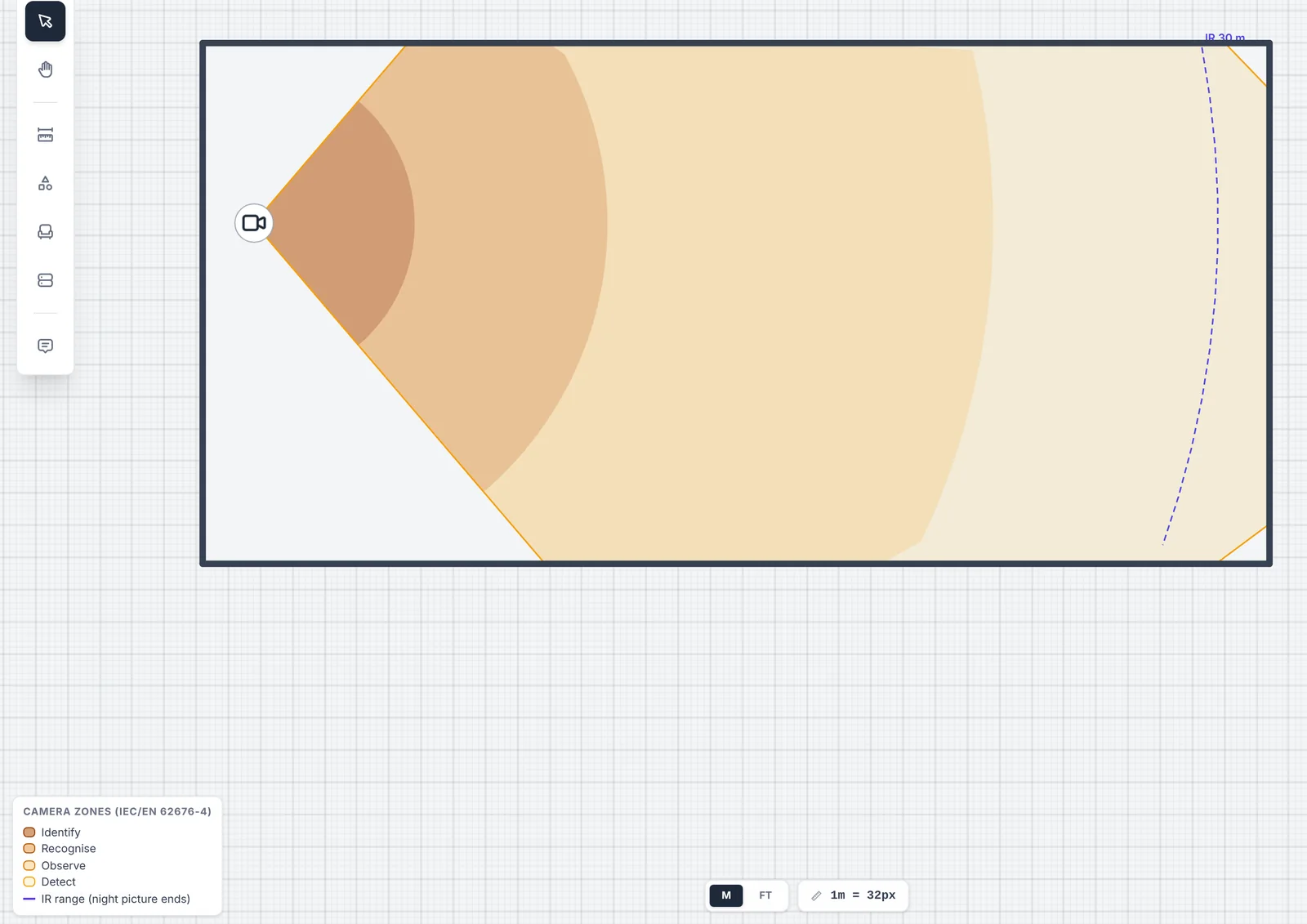
Where a camera’s datasheet gives DORI distances, its cone is split into the four bands of IEC/EN 62676-4, darker nearer the camera: identify, recognise, observe and detect. The IR range is a dashed arc across the cone, where the night picture ends. Walls still cut every band. The bands are only drawn from the datasheet’s own figures, never worked out from resolution and lens, so the plan doesn’t contradict the document the client can look up.
Where the figures come from
Every model in the catalog cites its source: the manufacturer’s datasheet, or a distributor’s copy of it where no manufacturer copy could be found. Intelbras models link to their product page on the Intelbras site. Nothing is guessed: a figure the source doesn’t give is left out, and Strucit’s default fills that one gap.
Some figures are estimates, and they say so. Ubiquiti and Grandstream datasheets give an AP’s transmit power rather than its EIRP, so Strucit adds the antenna gain. Those APs show their power as estimated in the menu, and the report flags it on the model’s row.
When a plan uses models, the text report and the PDF get a Device models section. It opens with a note that the figures come from each model’s datasheet and are modelled for planning, to be checked before buying or installing. Then it lists each model with its type, how many devices use it and the link to its source. It is the page to point a client or a purchasing department at.
Generic is still there
Every device starts generic, and plans saved before the catalog keep working unchanged. A device you leave on Generic uses Strucit’s default estimates, and you can still type its specs by hand. That is also the way for a model that isn’t in the catalog: the catalog is built in, the same for everyone, with no custom models. It has no prices either: it is for planning, not a price list.
Free and Pro
Picking models is free on every device, and so is the text report’s Device models section. Where the figures show up in a Pro feature, they follow it: the DORI bands are drawn by the camera coverage layer, the EIRP feeds the Wi-Fi heatmap, and the PDF has its own Device models section, all Pro. The full brand list is on the device catalog page.
Got a quote going out this week? Open it in Strucit, select a camera and pick the model you’re installing.